Linux is a real joy compared to Windows. Finally, my computer is my own again. No more nagging ads, settings changing automatically, or random telemetry taking up valuable CPU time. Using Linux is like getting rid of that old 1961 American Rambler and finally joining modern society with an electric car.
Using Hyprland is like ditching your car for a spaceship. Not very practical for commuting, but really fun nonetheless. And, everyone stares at you whenever you land it in the grocery store parking lot, so it’s all worth it, right?
Since Hyprland is a relatively new Wayland compositor, there are a few things that bothered me when attempting to implement the experience I wanted.
Disable Touchpad While Typing
Hyprland has a built in setting (input:touchpad:disable_while_typing) to hopefully prevent palms from messing with the cursor. If you’re lucky, Hyprland thinks your touchpad is a mouse, so this setting doesn’t work at all.
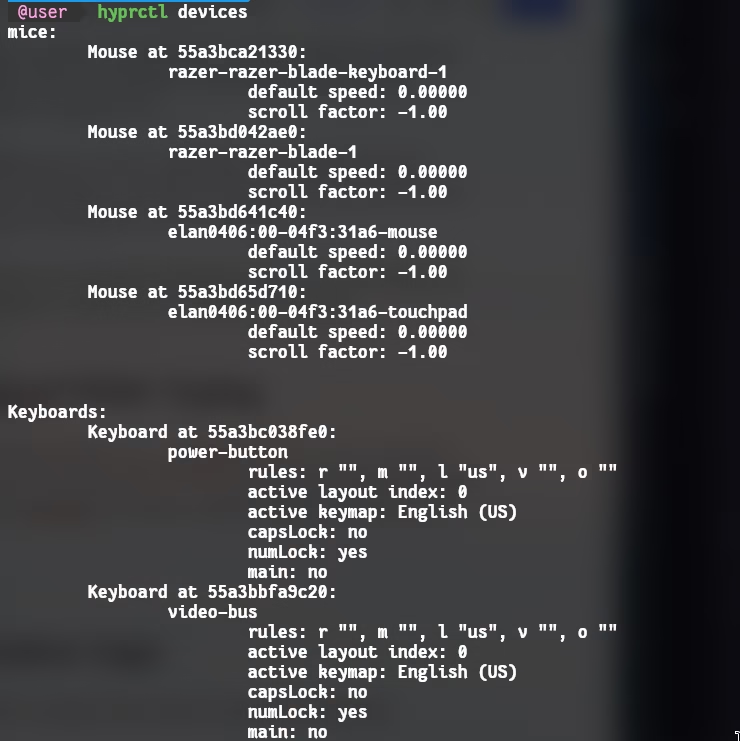
We can re-implement our desired behavior:
- Read input from our main keyboard
- Disable the touchpad device on input
- Re-enable the touchpad device after X ms have elapsed
First we’ll figure out our devices.
ls /dev/input/by-id/
There may be a few that match what we’re looking for. usb-Razer_Razer_Blade-if01-event-kbd was the one that worked in my case.
And then from the previous screenshot where we ran hyprctl devices, we’ve already discovered the touchpad is elan0406:00-04f3:31a6-touchpad.
We could choose any language to write a daemon, but I’ll pick C. It’s fast, performant, and has a tiny memory footprint. This will allow the daemon/program to sit at 0% CPU usage when idle and take up mere megabytes of our RAM.
#include <stdio.h>
#include <fcntl.h>
#include <unistd.h>
#include <linux/input.h>
#include <stdlib.h>
#include <time.h>
#include <errno.h>

#define KEYBOARD_DEV "/dev/input/by-id/usb-Razer_Razer_Blade-if01-event-kbd"
#define DISABLE_CMD "hyprctl keyword \"device[elan0406:00-04f3:31a6-touchpad]:enabled\" false >/dev/null 2>&1"
#define ENABLE_CMD  "hyprctl keyword \"device[elan0406:00-04f3:31a6-touchpad]:enabled\" true >/dev/null 2>&1"
#define TIMEOUT_MS 300

int ignore_key(int keycode) {
    return (keycode == KEY_LEFTCTRL ||
            keycode == KEY_RIGHTCTRL ||
            keycode == KEY_LEFTALT ||
            keycode == KEY_RIGHTALT ||
            keycode == KEY_LEFTMETA ||
            keycode == KEY_RIGHTMETA ||
            keycode == KEY_FN ||
            keycode == KEY_FN_ESC ||
            keycode == KEY_TAB ||
            keycode == KEY_LEFTSHIFT ||
            keycode == KEY_RIGHTSHIFT ||
            keycode == KEY_ENTER
        );
}

int main() {
    system(ENABLE_CMD);

    int fd = open(KEYBOARD_DEV, O_RDONLY | O_NONBLOCK);
    if (fd < 0) {
        perror("Failed to open keyboard device");
        return 1;
    }

    struct input_event ev;
    int touchpad_disabled = 0;
    struct timespec last_keypress = {0, 0};

    while (1) {
        ssize_t r = read(fd, &ev, sizeof(ev));

        if (r == sizeof(ev)) {
            if (ev.type == EV_KEY && ev.value == 1) {
                // Ignore modifier keys
                if (ignore_key(ev.code)) {
                    goto skip_key;
                }

                if (!touchpad_disabled) {
                    system(DISABLE_CMD);
                    touchpad_disabled = 1;
                }
                clock_gettime(CLOCK_MONOTONIC, &last_keypress);
            }
        skip_key:;
        } else if (r < 0) {
            if (errno != EAGAIN && errno != EWOULDBLOCK) {
                perror("Read error");
                close(fd);

                sleep(1);
                fd = open(KEYBOARD_DEV, O_RDONLY | O_NONBLOCK);
                if (fd < 0) {
                    perror("Failed to reopen keyboard device");
                    return 1;
                }
            }
        } else if (r == 0) {
            fprintf(stderr, "Device disconnected, attempting to reconnect...\n");
            close(fd);
            sleep(1);
            fd = open(KEYBOARD_DEV, O_RDONLY | O_NONBLOCK);
            if (fd < 0) {
                perror("Failed to reopen keyboard device");
                return 1;
            }
        }

        if (touchpad_disabled) {
            struct timespec now;
            clock_gettime(CLOCK_MONOTONIC, &now);
            long elapsed_ms = (now.tv_sec - last_keypress.tv_sec) * 1000 +
                              (now.tv_nsec - last_keypress.tv_nsec) / 1000000;

            if (elapsed_ms >= TIMEOUT_MS) {
                system(ENABLE_CMD);
                touchpad_disabled = 0;
            }
        }

        usleep(10000);
    }

    close(fd);
    return 0;
}
Let’s use it: gcc typingtpblock.c -o typingtpblock && sudo mv ./typingtpblock /usr/local/bin/
Now we just need to run it on start somehow according to your distribution. Adding it to your Startup_Apps.conf is a fine choice.
exec-once = /usr/local/bin/typingtpblock
https://github.com/gen3vra/hypr-disable-touchpad-while-typing
Fullscreen Window Gaps
Hyprland is a tiling Wayland compositor. You can adjust the gaps and spacing between windows for your preferred look.
general {
  border_size = 1
  gaps_in = 3
  gaps_out = 2
}
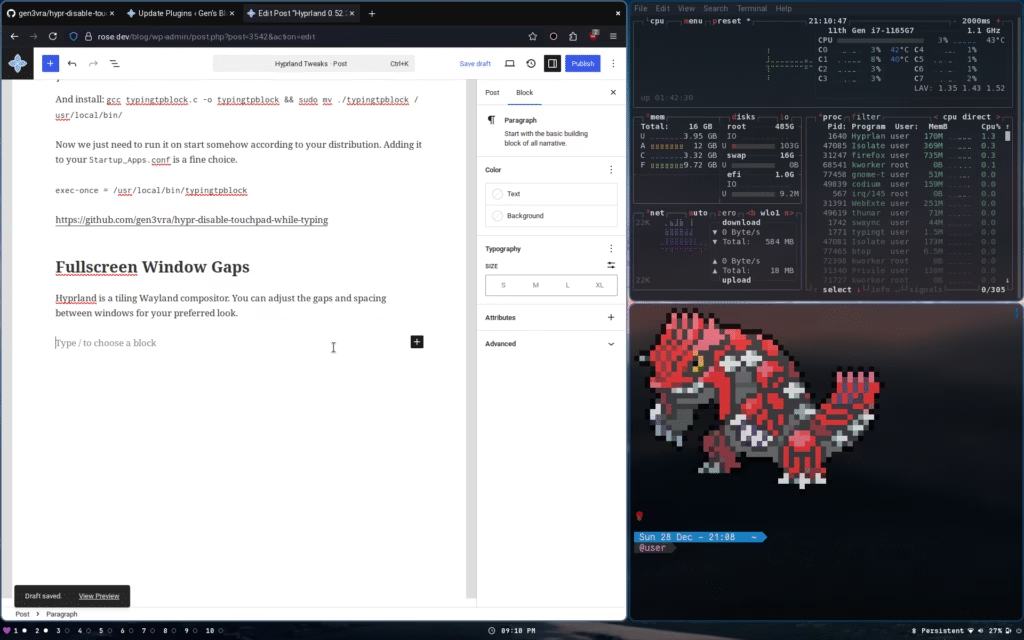
Here’s a more exaggerated value of 20 for each.
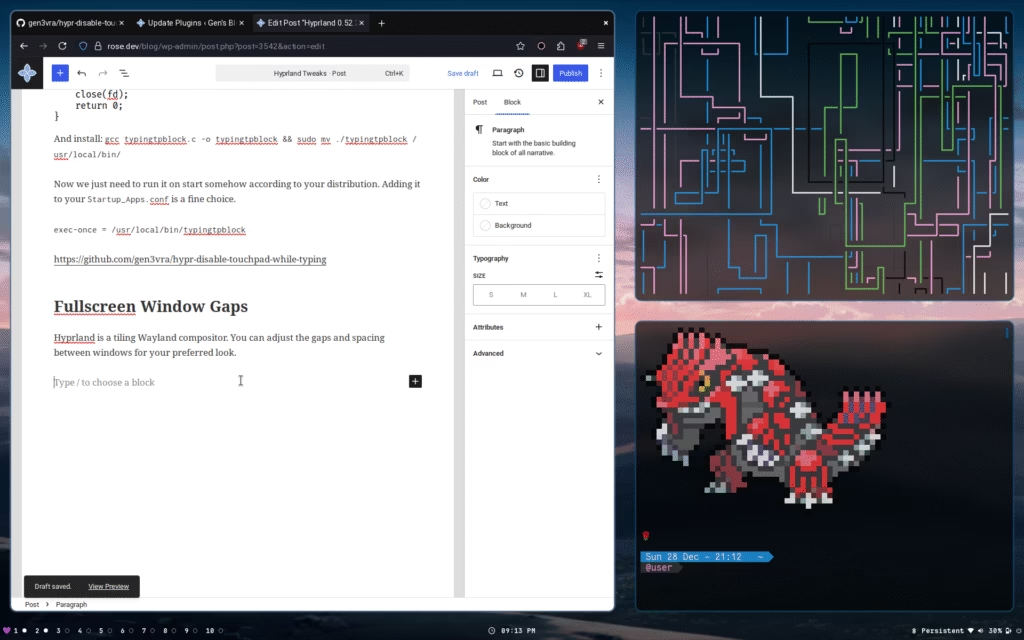
Unfortunately, when you fullscreen an application the gaps you chose will stay the same. This means no matter your gap preference, unless it’s 0, you can see behind the window.
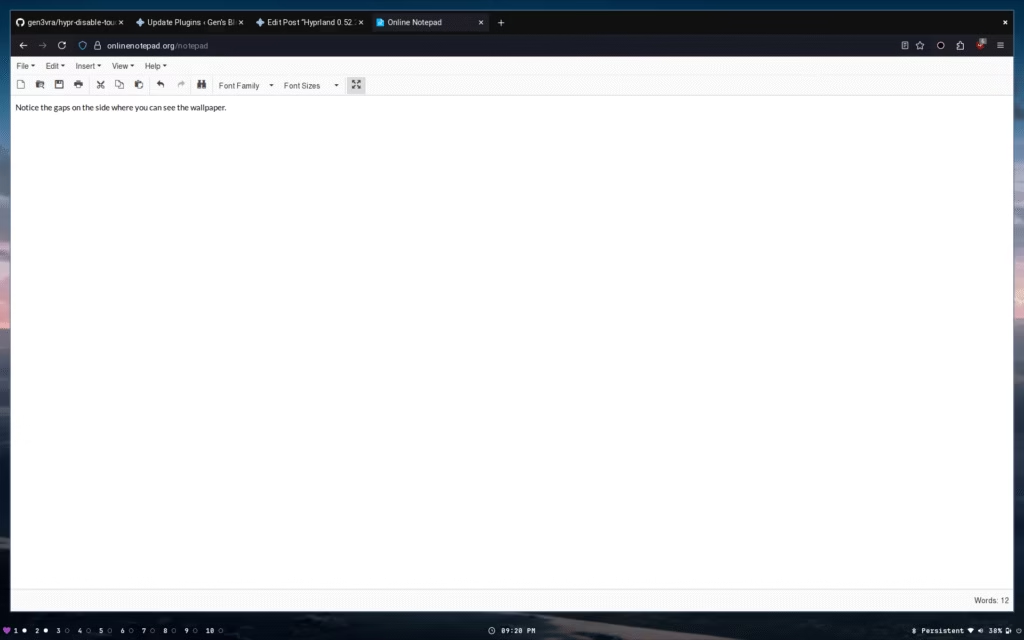
You also have to disable rounded corners, otherwise there will be tiny gaps in all four quadrants.
Additionally, by default there’s no visual variation between a window that exists by itself on a workspace, and a fullscreen window. This can lead to confusion unless you explicitly style fullscreen windows borders differently.
We can add some configurations to our hyprland.conf to differentiate it a bit.
windowrule = bordercolor rgb(ffc1e4), fullscreen:1
windowrule = rounding 0, fullscreen:1
windowrule = bordersize 2, fullscreen:1 # or 0 for none
As stated above, if we’ve set any gap size at all, there will still be space between the fullscreen window and the screen edge. This is not ideal.
Let’s fix it. You’d think we can just do something similar to the above, right?
windowrule = gapsin 0, fullscreen:1
windowrule = gapsout 0, fullscreen:1
Wrong! These are not valid properties. You must set them in the general or workspace namespace.
Okay, so we want an application that can do the following:
- Keep track of the fullscreen state
- Change the configuration when fullscreen
- Leave all other windows alone
We could bind a fullscreen shortcut to run a script that would both update the gap settings and toggle fullscreen for the active window. This seems fine and recommended. Unfortunately this is a bad solution, because there are way too many edge cases to handle.
- Double clicking a titlebar to maximize would not trigger our solution
- Maximizing, then closing the application window would not update our tracked boolean, making the next maximize do nothing until pressed twice
- Maximizing, then tabbing to another workspace would mean our settings changes remain, making all normal windows have no gap
We could try to track window closes and any potential edge case, but it becomes messy and complex quickly, without solving the problem cleanly.
The solution is yet another lightweight daemon. We can track fullscreen changes directly from the compositor socket itself, ensuring we catch everything. Once we know the fullscreen state and which window specifically, it’s trivial to hand that information off to a script that handles setting changes for us.
But wait, how does this solve the problem of settings applying to all our other windows which aren’t fullscreen? The hint was mentioned above.
Hyprland has individual workspace separated settings, so you can do something like this:
workspace = 1, gapsin:3, gapsout:2
workspace = 2, gapsin:10, gapsout:10 # example
workspace = 3, gapsin:5, gapsout:12 # example
workspace = 4, gapsin:20, gapsout:9 # example
This is important because logically, if a window were fullscreened on a certain workspace, no other windows are visible. That means an individual workspace config essentially becomes that window’s config.
The last piece we need is to find out where we can get window information from. The hyprctl activewindow -j command is perfectly suitable for this.
I’m going to write the daemon in C again for the same reasons mentioned above.
#define _GNU_SOURCE
#include <errno.h>
#include <stdio.h>
#include <stdlib.h>
#include <string.h>
#include <sys/socket.h>
#include <sys/un.h>
#include <unistd.h>
#define BUF_SIZE 4096
static void tag_window(const char *addr, int add) {
  if (!addr || !addr[0])
    return;
  char cmd[512];
  int ret =
      snprintf(cmd, sizeof(cmd),
               "hyprctl dispatch tagwindow %s%sfullscreen_mode address:%s > /dev/null 2>&1",
               add ? "+" : "-- -", add ? "" : "", addr);
  if (ret < 0 || ret >= sizeof(cmd))
    return;
  system(cmd);
}
static void run_fullscreen_handler(const char *addr, int fs, int workspace) {
  if (!addr || !addr[0])
    return;
  char cmd[512];
  int ret = snprintf(
      cmd, sizeof(cmd),
      "/home/user/.config/hypr/UserScripts/FullscreenHandler.sh %s %d %d > /dev/null 2>&1",
      addr, fs, workspace);
  if (ret < 0 || ret >= sizeof(cmd))
    return;
  system(cmd);
}
static void query_active_window(void) {
  FILE *fp = popen("hyprctl activewindow -j", "r");
  if (!fp) {
    fprintf(stderr, "Failed to query active window\n");
    return;
  }
  char buf[BUF_SIZE];
  char address[128] = {0};
  int fullscreen = -1;
  int workspace = -1;
  int in_workspace = 0;
  while (fgets(buf, sizeof(buf), fp)) {
    if (strstr(buf, "\"address\"")) {
      sscanf(buf, " \"address\": \"%[^\"]\"", address);
    }
    if (strstr(buf, "\"fullscreen\"")) {
      sscanf(buf, " \"fullscreen\": %d", &fullscreen);
    }
    // Handle json workspace object
    if (strstr(buf, "\"workspace\"")) {
      in_workspace = 1;
    }
    if (in_workspace && strstr(buf, "\"id\"")) {
      sscanf(buf, " \"id\": %d", &workspace);
      in_workspace = 0;
    }
  }
  pclose(fp);
  if (fullscreen == -1 || !address[0] || workspace == -1)
    return;
  //printf("fullscreen=%d window=%s workspace=%d\n", fullscreen, address, workspace);
  //fflush(stdout);
  if (fullscreen == 1) {
    tag_window(address, 1);
  } else if (fullscreen == 0) {
    tag_window(address, 0);
  }
  run_fullscreen_handler(address, fullscreen, workspace);
}
int main(void) {
  const char *runtime = getenv("XDG_RUNTIME_DIR");
  const char *sig = getenv("HYPRLAND_INSTANCE_SIGNATURE");
  if (!runtime || !sig) {
    fprintf(stderr, "Hyprland environment not detected\n");
    return 1;
  }
  char sockpath[512];
  int ret = snprintf(sockpath, sizeof(sockpath), "%s/hypr/%s/.socket2.sock",
                     runtime, sig);
  if (ret < 0 || ret >= sizeof(sockpath)) {
    fprintf(stderr, "Socket path too long\n");
    return 1;
  }
  int fd = socket(AF_UNIX, SOCK_STREAM, 0);
  if (fd < 0) {
    perror("socket");
    return 1;
  }
  struct sockaddr_un addr = {0};
  addr.sun_family = AF_UNIX;
  strncpy(addr.sun_path, sockpath, sizeof(addr.sun_path) - 1);
  if (connect(fd, (struct sockaddr *)&addr, sizeof(addr)) < 0) {
    perror("connect");
    close(fd);
    return 1;
  }

  // Normalize workspaces
  char cmd[512];
  int resetRet = snprintf(
      cmd, sizeof(cmd),
      "/home/user/.config/hypr/UserScripts/FullscreenHandler.sh %s %d %d > /dev/null 2>&1",
      "discard", -1, -1);
  if (resetRet < 0 || resetRet >= sizeof(cmd))
    return 1;
  system(cmd);

  // Watch for changes
  char buf[BUF_SIZE];
  while (1) {
    ssize_t n = read(fd, buf, sizeof(buf) - 1);
    if (n < 0) {
      if (errno == EINTR)
        continue;
      perror("read");
      break;
    }
    if (n == 0)
      break;
    buf[n] = '\0';
    if (strstr(buf, "fullscreen>>")) {
      query_active_window();
    }
  }
  close(fd);
  return 0;
}
gcc fullscreen-window-watcher.c -o fullscreen-window-watcher && sudo mv ./fullscreen-window-watcher /usr/local/bin/
This program will be updated with each fullscreen change from Hyprland itself. It then passes the actual action off to FullscreenHandler.sh with the window address, fullscreen status, and workspace. It also tags the window in case we want to do any future actions, but you may omit this part without any loss of functionality.
The handler script is quite basic, and will update the actual settings.
#!/bin/bash
ADDR="$1"
FS="$2"          # 0, 1, or 2
WS="$3"          # 1-10, or -1 to reset all

# Config file to edit
HYPR_CONF="$HOME/.config/hypr/UserConfigs/UserDecorations.conf"  # adjust if needed

# Normal vs Fullscreen configuration
NO_BORDER_GAP="gapsin:0, gapsout:0"
NORMAL_BORDER_GAP="gapsin:3, gapsout:2"

if [ "$WS" -eq -1 ]; then
    for i in {1..10}; do
        LINE_TO_INSERT="workspace = ${i}, $NORMAL_BORDER_GAP"
        sed -i "/^#${i}:DYNAMIC WORKSPACE PLACEHOLDER \[ns\]/{n;s/.*/$LINE_TO_INSERT/;}" "$HYPR_CONF"
    done
    #echo "Reset all workspaces to normal padding"
    exit 0
fi

# 0 = not fs, 1 = fs, 2 = exclusive fs
if [ "$FS" -eq 1 ]; then
    LINE_TO_INSERT="workspace = ${WS}, $NO_BORDER_GAP"
else
    LINE_TO_INSERT="workspace = ${WS}, $NORMAL_BORDER_GAP"
fi

# Use sed to replace the line after the workspace comment, in-place
sed -i "/^#${WS}:DYNAMIC WORKSPACE PLACEHOLDER \[ns\]/{n;s/.*/$LINE_TO_INSERT/;}" "$HYPR_CONF"
#echo "Updated workspace $WS with $( [ $FS -eq 1 ] && echo 'no-border padding' || echo 'normal padding')"
There’s probably a better way than using sed. Regardless, if you structure a section in your UserDecorations.conf as the script expects, it will work perfectly.
## EXAMPLE ##
# You CAN use a tag but it has a few ms delay and we can handle everything needed with fullscreen:1 match right now
#windowrule = bordercolor rgb(00ff00), tag:fullscreen_mode
windowrule = bordercolor rgb(ffc1e4), fullscreen:1
windowrule = rounding 0, fullscreen:1
# Can do bordersize 10 for a fun indicator around or something
windowrule = bordersize 0, fullscreen:1

# This section is replaced by SED from $UserScripts/FullscreenHandler.sh
#1:DYNAMIC WORKSPACE PLACEHOLDER [ns]
workspace = 1, gapsin:3, gapsout:2
#2:DYNAMIC WORKSPACE PLACEHOLDER [ns]
workspace = 2, gapsin:3, gapsout:2
#3:DYNAMIC WORKSPACE PLACEHOLDER [ns]
workspace = 3, gapsin:3, gapsout:2
#4:DYNAMIC WORKSPACE PLACEHOLDER [ns]
workspace = 4, gapsin:3, gapsout:2
#5:DYNAMIC WORKSPACE PLACEHOLDER [ns]
workspace = 5, gapsin:3, gapsout:2
#6:DYNAMIC WORKSPACE PLACEHOLDER [ns]
workspace = 6, gapsin:3, gapsout:2
#7:DYNAMIC WORKSPACE PLACEHOLDER [ns]
workspace = 7, gapsin:3, gapsout:2
#8:DYNAMIC WORKSPACE PLACEHOLDER [ns]
workspace = 8, gapsin:3, gapsout:2
#9:DYNAMIC WORKSPACE PLACEHOLDER [ns]
workspace = 9, gapsin:3, gapsout:2
#10:DYNAMIC WORKSPACE PLACEHOLDER [ns]
workspace = 10, gapsin:3, gapsout:2
Add a line in our Startup_Apps.conf: exec-once = /usr/local/bin/fullscreen-window-watcher, and voilà.
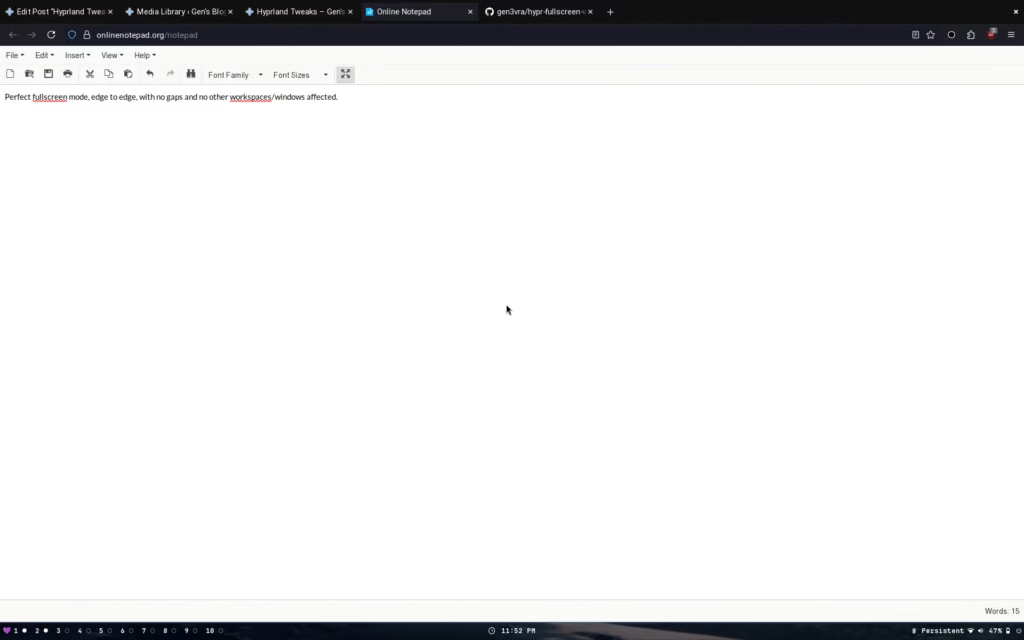
Regardless of bindings or how we achieved fullscreen, our app now has no gap or border. Additionally, tabbing to other workspaces works perfectly, and exiting the app in any way properly resets the settings. Sleek.
https://github.com/gen3vra/hypr-fullscreen-window-watcher
Performance


0% CPU and less than 2MB of RAM for each.
It helps me if you share this post
https://rose.dev/blog/2025/12/29/hyprland-tweaks/
Published 2025-12-29 00:23:47